
Help Center
Billing & Payments
IPbnb Free Trial Guide: What You Get and How to Start
This guide explains what the trial includes, how to activate it, and what happens when the 30 days are up.
3
min.
Reading time
Beginner
Complexity level
Table of Contents
item
Not ready to commit to a paid lease yet? IPbnb offers an IPv4 free trial so you can test the platform before spending anything. Choose one /24 subnet from the catalog, try the IPv4 block for 30 days at no cost, and only then decide whether to continue.
What's Included in the Trial
The IPbnb IPv4 free trial gives you:
One /24 subnet (256 IP addresses) of your choice from the catalog
30 days of full access - same conditions as a paid lease
LOA (Letter of Authorization) generated automatically after ASN assignment
No Credit Balance required and no card data collected to start the trial
The trial is available once per company account. To test an IPv4 lease on IPbnb, your company account must be verified before you submit the request. If you haven't registered yet, see Account Setup and Company Verification first.
Want to know more about how IPv4 leasing works on IPbnb before getting started? See the Lease IPv4 page.
Step-by-Step Activation
Estimated time: 5 minutes
Step 1: Open the IP Catalog
Log in to your IPbnb account and go to IP Catalog in the left sidebar.
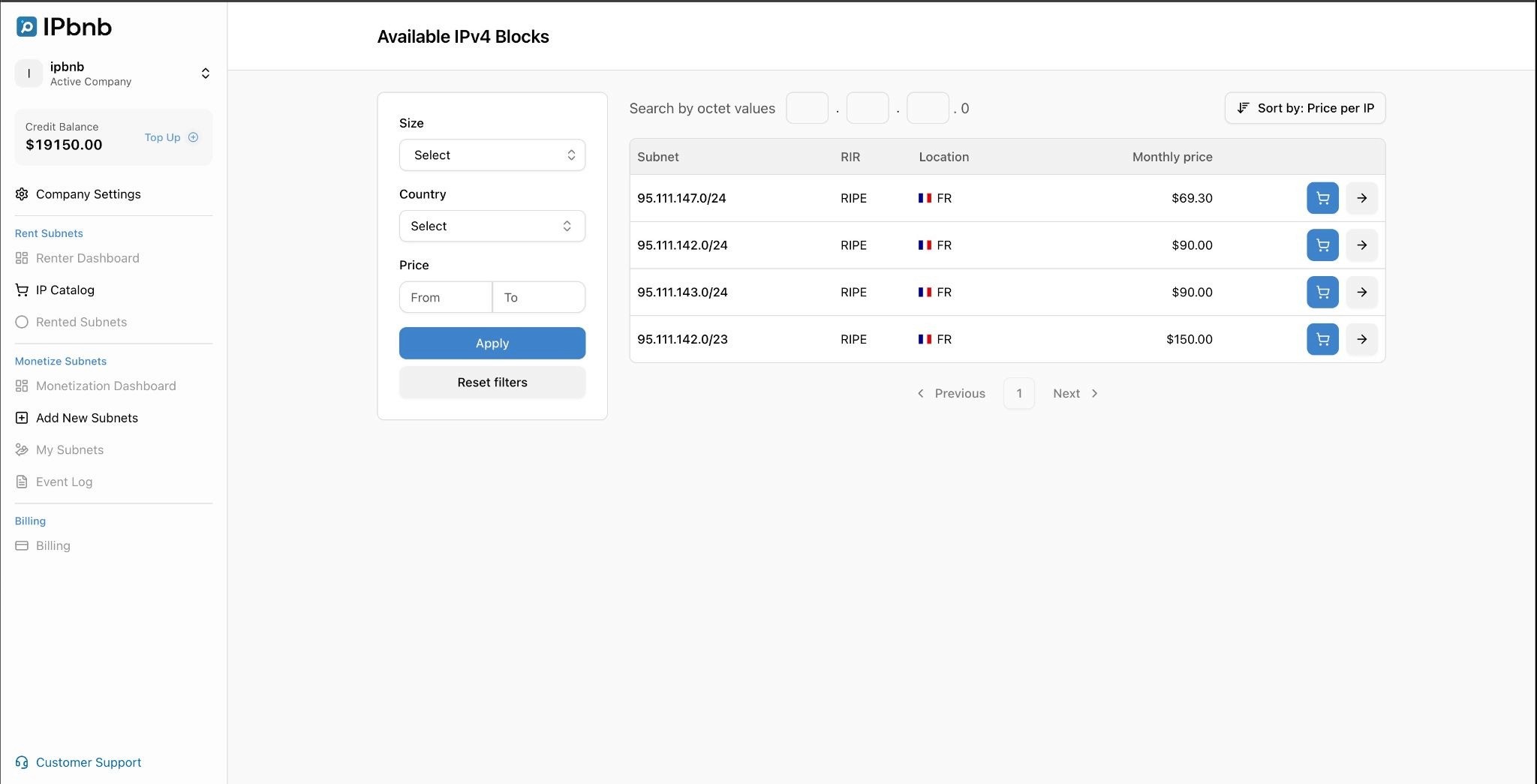
Step 2: Filter by /24
Use the Size filter to select /24. You can also apply country and price filters to narrow down the results. Only /24 subnets are eligible for the free trial.
Step 3: Select a Subnet
Click on any subnet in the list to open its detail page. Review the location (provided by MaxMind) and registrar to confirm the subnet fits your needs.
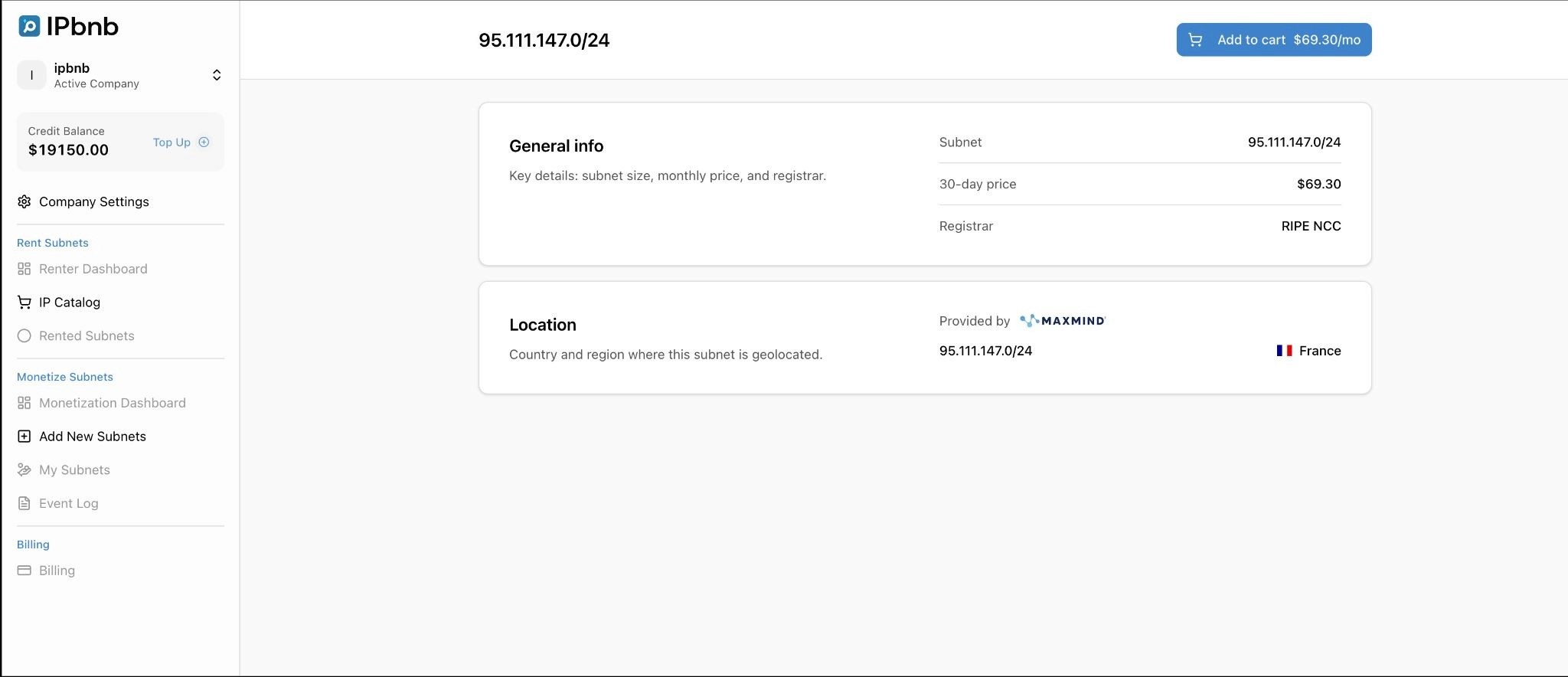
Step 4: Add to Cart
Click Add to cart on the subnet detail page. The button changes to Remove from cart, and a notification appears:
"Subnet added to cart. You have 180 minutes to complete the purchase. After that, the subnet will be released back to the catalog."
Click View cart in the notification, or go to Cart in the left sidebar.
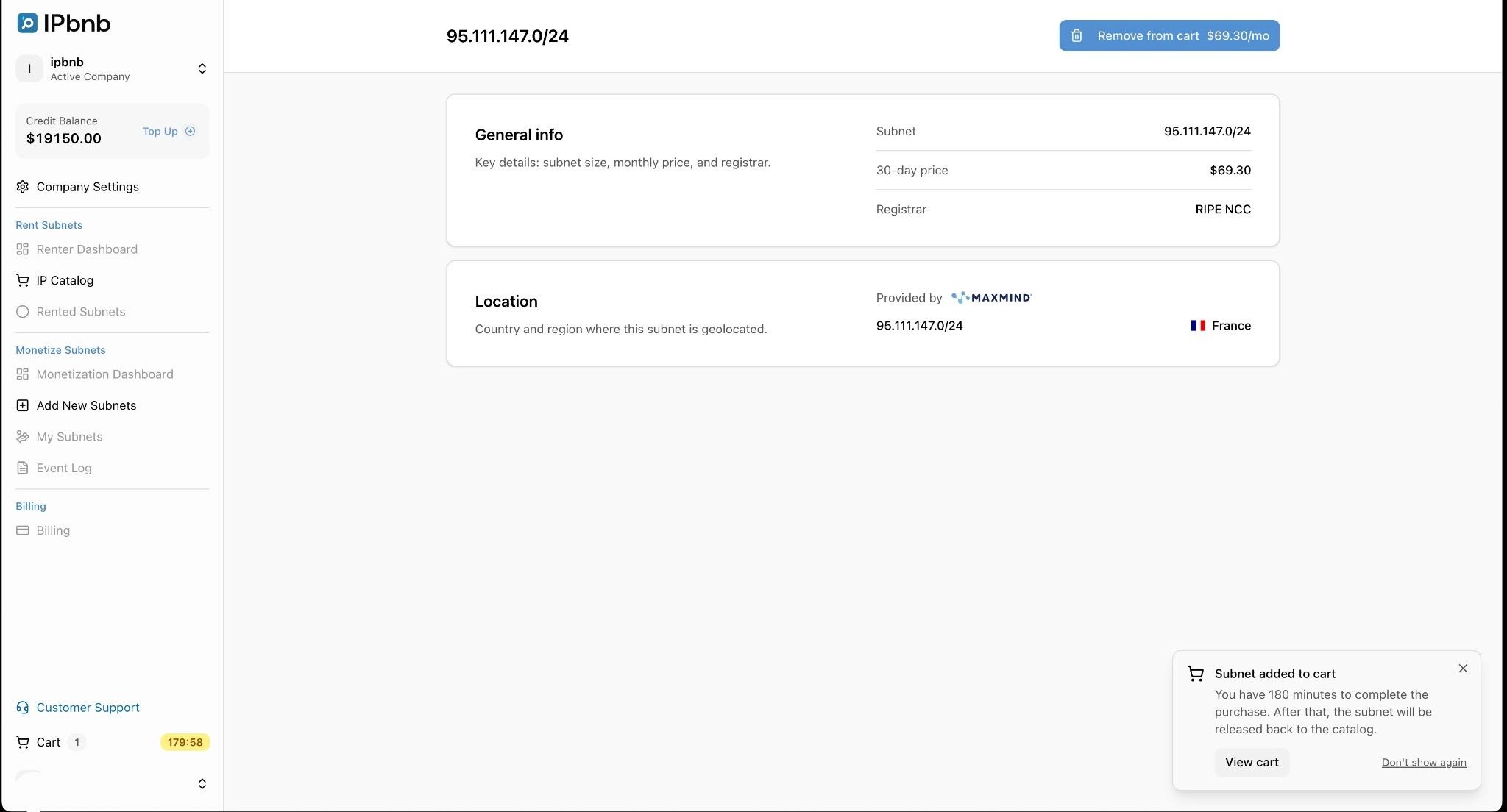
Important: The 180-minute timer starts as soon as you add a subnet to your cart. If it runs out before you submit your request, the subnet returns to the catalog and you will need to add it again.
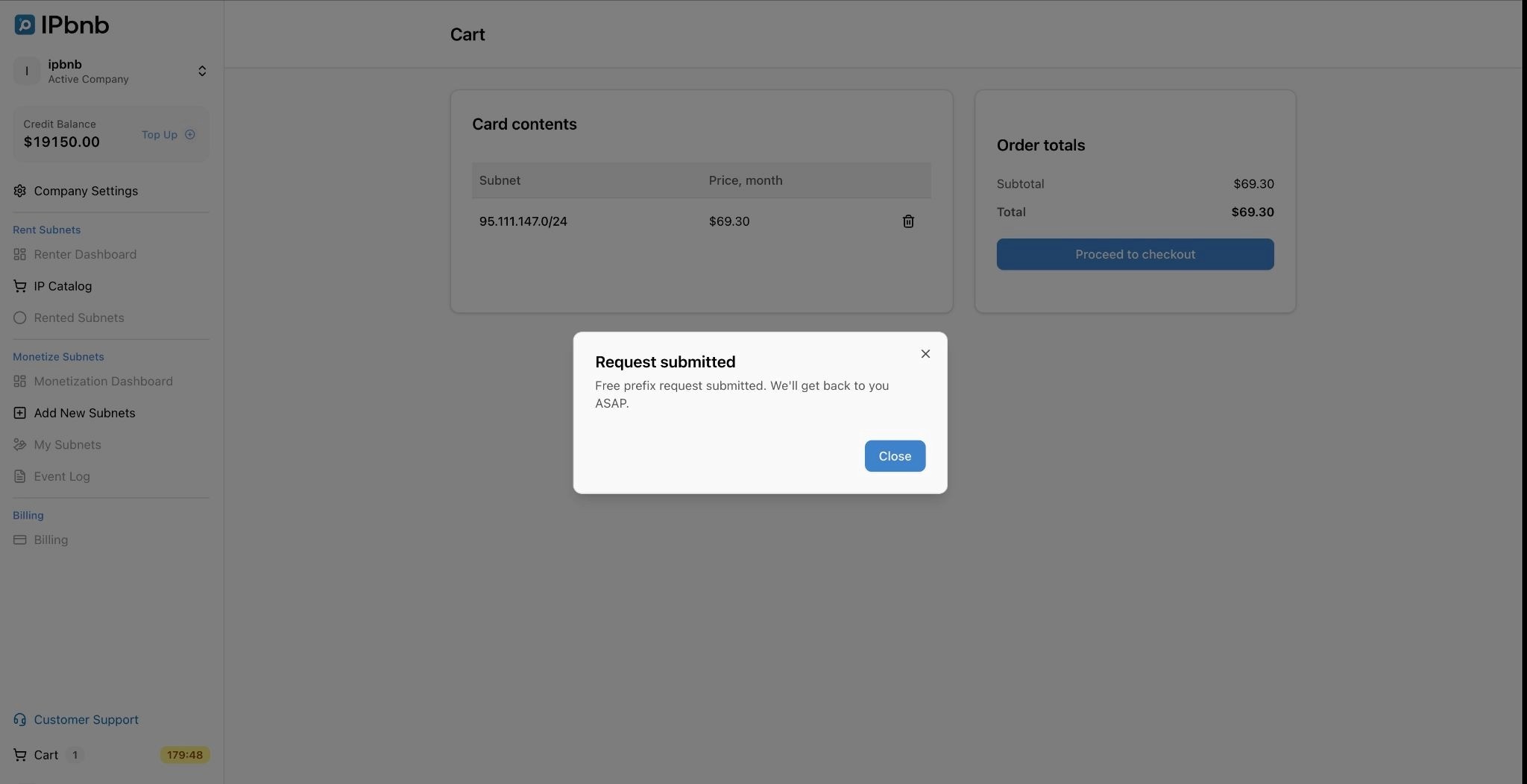
Step 5: Request the Free Trial
In the cart, find the Order totals section on the right. Click Request one /24 for 30 days for free.
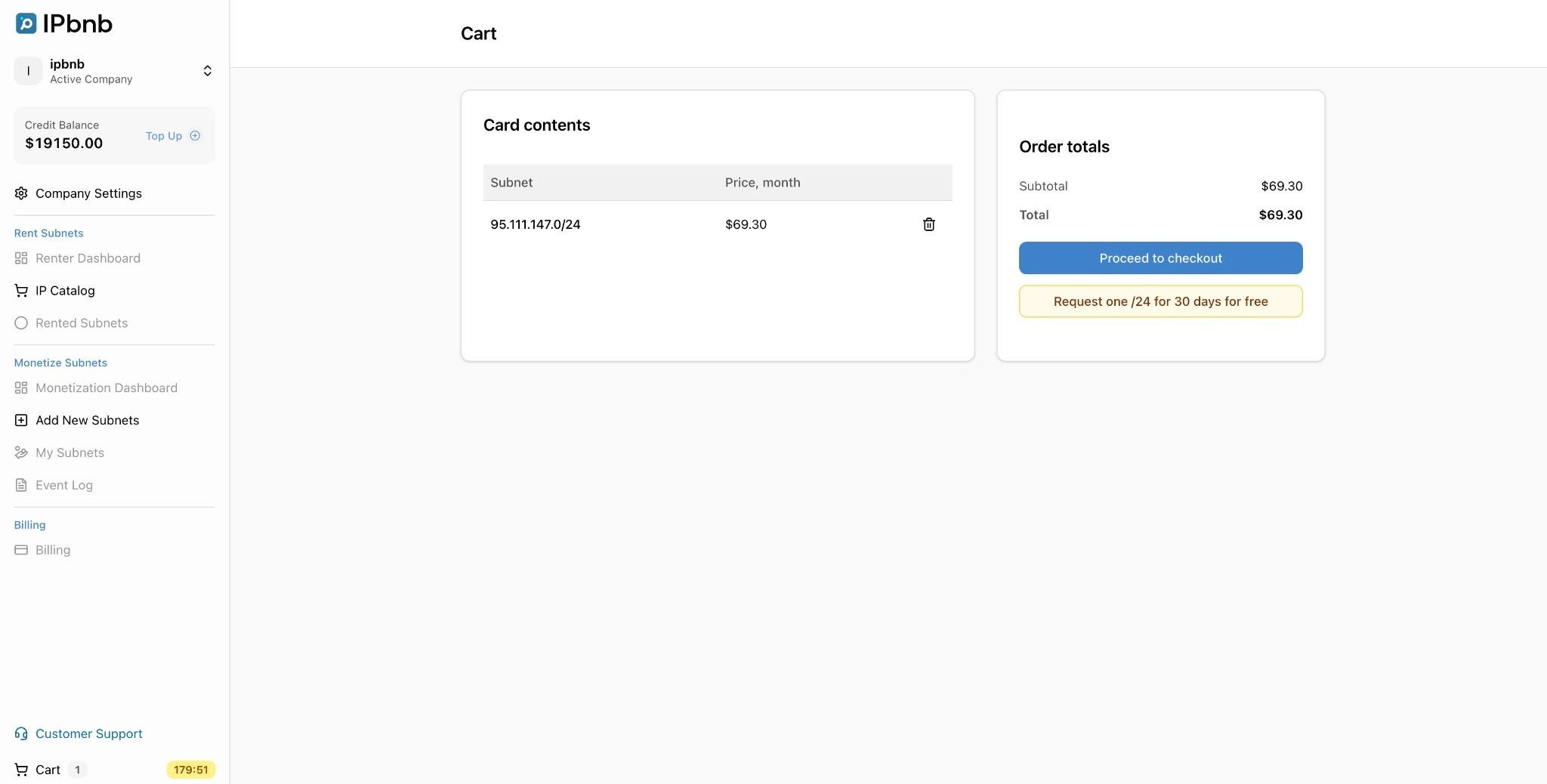
A confirmation window appears:
"Request submitted. Free prefix request submitted. We'll get back to you ASAP."
Click Close. Your request has been sent to the IPbnb team, who will review it and contact you to confirm and activate your trial subnet. Expect a response within one business day.
For the full leasing walkthrough - including cart management and payment - see How to Lease Subnets on IPbnb.
Configuration During Trial
Once your trial subnet is active, you configure it exactly the same way as a paid lease. There are no restrictions during the trial period.
What you need to do after activation:
Assign your subnet to your ASN in the IPbnb dashboard - go to Rented Subnets, select your subnet, and click Assign to ASN
Provide your network provider with the LOA - IPbnb generates it automatically after ASN assignment
Wait for BGP route propagation - typically a few minutes to a few hours depending on your provider
Important: Your subnet will not route traffic until it has been assigned to an ASN and your provider has completed the announcement.
For step-by-step configuration instructions, see Configure Your Leased Subnet. If you want to check your subnet's IP reputation before putting it into production, see How to Check & Clean IP Reputation Before Using Leased Blocks.
Converting to a Paid Plan
When you start a free trial, IPbnb does not collect any card details or require a Credit Balance. This means the transition to a paid lease is not automatic - you need to take one action before the trial ends.
What you need to do:
Log in to your IPbnb account and make your first Credit Balance top-up before the 30-day trial period expires. Go to your account dashboard and navigate to Credit Balance - Add Funds. When you complete the top-up, your payment method is linked to the account, and future daily charges are deducted automatically from that point onward.
Important: IPbnb sends you a reminder email 3 days before your trial ends. Use that as your cue to top up if you haven't already. If the trial period expires without a top-up, your lease will be interrupted.
What happens after you top up:
The first charge covers 30 days upfront, deducted from your Credit Balance immediately
From day 31 of the paid period onward, daily charges are deducted automatically at 00:00 UTC
No further action is needed as long as your balance stays funded
To estimate your costs before the trial ends, use the IPv4 Pricing Calculator.
For full details on billing, low-balance alerts, and payment recovery, see How to Manage Subnets on IPbnb.
FAQ
Who can use the IPv4 free trial?
The trial is available to any verified IPbnb company account. It can be used once per company.
Can I choose which /24 subnet I get?
Yes. You browse the catalog, select the /24 that fits your needs, and add it to your cart before submitting the request.
Do I need a Credit Balance to start the trial?
No. You do not need any funds in your Credit Balance, and no card details are required to submit a free trial request. However, you will need to make your first top-up before the 30 days end if you want to continue using the subnet.
How long does it take to activate the trial after I submit the request?
The IPbnb team reviews requests manually and will contact you within one business day to confirm and activate your subnet.
When will I be reminded to top up my Credit Balance?
IPbnb sends a reminder email 3 days before your trial period expires. You can also top up at any point before that - there is no requirement to wait until the reminder.
What happens if I don't top up my Credit Balance before the trial ends?
Your lease will be interrupted. To continue using the subnet, you must make your first Credit Balance top-up before the trial expires. If you miss the deadline, contact support@ipbnb.com.
Can I terminate the lease before the trial ends?
Termination is not available during the first 30 days of a lease. If you experience a technical issue with your subnet during the trial, contact support@ipbnb.com.
Related articles