


IP Reputation Tools & Best Practices 2026: Monitoring, Checking, and Protecting Your IPs
Your IP reputation is a trust score that decides if your traffic gets through or gets blocked. Here are the best tools and proven practices to check, fix, and monitor it at scale in 2026.

Artem Kohanevich
Co-Founder & CEO at IPbnb
Last updated
Table of Contents
item
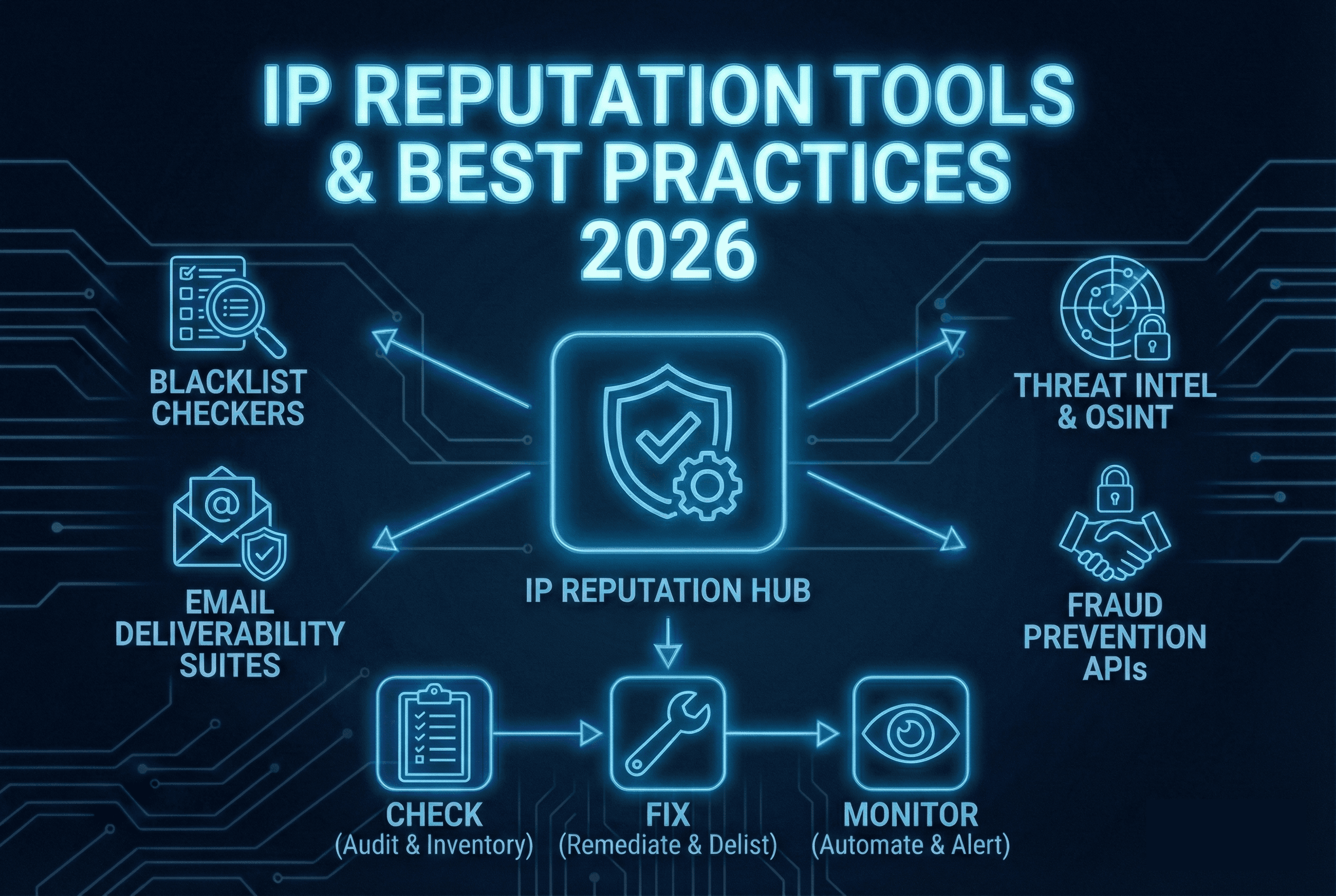
IP reputation is a score that reflects whether an IP address is associated with malicious activity, spam, or abuse - and in 2026, it works exactly like a credit score. Instead of determining whether you can get a loan, it decides whether your emails land in inboxes, your API requests go through, or your traffic gets flagged as suspicious.
Here's what's at stake: A poor IP reputation means blocked emails, rejected API calls, degraded CDN performance, and fraud detection systems treating your legitimate traffic like a threat. And the consequences spread fast – one compromised IP can contaminate your entire infrastructure.
The environment has gotten tougher. Cyberattacks are hitting record levels, forcing mailbox providers to tighten their filtering rules. Regulators are scrutinizing data flows more closely than ever. Meanwhile, businesses increasingly rely on third-party IP pools through proxies and IPv4 leasing arrangements, creating new vulnerabilities they don't fully control.
When evaluating providers, use our 10-point provider comparison checklist.
Whether you want to sell IP addresses or lease them, your IP reputation determines if your traffic gets trusted or blocked - often before it reaches its destination. Regular IP reputation checks aren't optional anymore; they're essential infrastructure hygiene.
What Is IP Reputation and Why Does It Matter in 2026?
Your IP address reputation is a trust score that determines whether your traffic gets through or gets blocked. Every time your IP sends an email, makes an API request, or routes traffic, receiving systems check this score to decide: legitimate or threat?
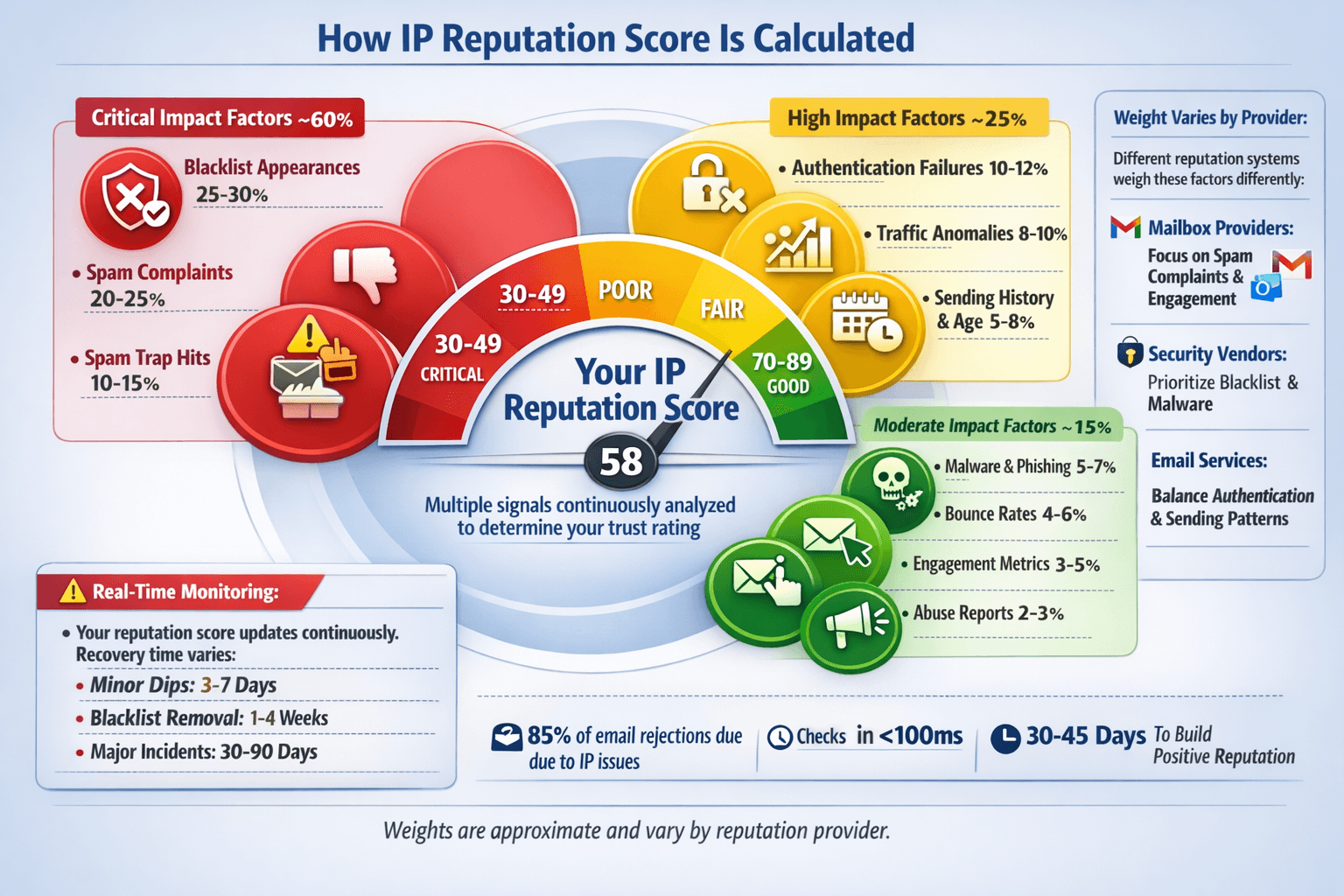
Think of it as a constantly updating background check. Security systems, mailbox providers, and network operators monitor dozens of behavioral signals to calculate your IP reputation score:
Spam complaints and spam trap hits
Blacklist appearances across major reputation databases
Traffic volume anomalies that suggest botnet activity
Malware distribution or phishing attempts
Authentication failures (SPF, DKIM, DMARC for email)
Abuse reports from users or security vendors
IP reputation vs domain reputation: What's the difference?
IP address reputation evaluates your infrastructure – the actual server sending traffic. Domain reputation assesses your brand identity – the domain in your email or URL. For high-volume email senders, IP reputation often matters more. For web traffic and API requests, IP reputation typically takes priority since domains can easily be spoofed while infrastructure patterns are harder to fake.
Why IP reputation security risk matters across your business in 2026:
Email & transactional messaging: Deliverability drops, customer communications fail
API authentication: Rate limiting kicks in, legitimate requests get rejected
Fintech & payments: Fraud systems flag transactions, increasing false positives
Gaming platforms: Players face login issues, DDoS protection blocks legitimate traffic
Proxy & VPN services: Service quality degrades as networks blacklist your IPs
IPv4 leasing operations: Portfolio monetization potential plummets when IPs carry reputation damage
Monetize your IPv4 addresses through a platform that protects your asset's reputation.
Types of IP Reputation Tools (and When to Use Each)
IP reputation tools aren't one-size-fits-all. Each category serves specific needs, and understanding the differences helps you build an effective monitoring strategy without drowning in redundant platforms.
Lookup & Blacklist Checkers
Tools: Spamhaus, MXToolbox, EasyDMARC, Cisco Talos, AbuseIPDB, VirusTotal, IPQualityScore
These provide instant IP reputation checks and blacklist status for individual addresses. Perfect for troubleshooting delivery issues, vetting new infrastructure, or investigating suspicious IPs.
Best for: Spot checks, incident investigation, onboarding third-party IPs
Limitation: Reactive by nature – you have to remember to check. Most lack automated monitoring unless you integrate their IP reputation API.
Pro tip: Use bulk IP reputation check tools when auditing entire IP ranges or proxy pools.
Email Deliverability Suites
Tools: Google Postmaster Tools, Microsoft SNDS (Smart Network Data Services), ESP dashboards (SendGrid, Mailgun, Amazon SES), warm-up monitoring platforms
These email IP reputation checkers focus exclusively on sender reputation metrics: inbox placement rates, spam complaints, authentication failures, and engagement patterns.
Best for: High-volume email senders, marketing teams, transactional email operations
Limitation: Email-only focus – won't help with API traffic, web reputation, or fraud detection
Critical insight: Your ESP dashboard shows their view of your reputation; Postmaster Tools show how Gmail sees you. You need both perspectives.
Threat Intelligence & OSINT Tools
Tools: Cisco Talos Intelligence, GreyNoise, VirusTotal, AlienVault OTX, abuse.ch, SANS ISC
These aggregate global attack patterns, malware distribution networks, and abuse activity. They maintain comprehensive IP reputation lists updated in real-time from honeypots, security sensors, and community reports.
Best for: Security teams, SOC operations, proactive threat blocking
Limitation: False positives happen – shared hosting or NAT IPs may get flagged unfairly
Use case: Cross-reference suspicious IPs against multiple threat feeds before blocking
Risk-Scoring & Fraud Prevention APIs
Tools: IPQualityScore, IPQS, MaxMind minFraud, IPHub, IPinfo
These provide real-time reputation scoring during live user interactions – signups, logins, checkouts, form submissions. They analyze dozens of signals (proxy detection, geolocation consistency, abuse history) and return actionable risk scores in milliseconds.
Best for: E-commerce platforms, fintech, gaming, SaaS platforms fighting fraud
Limitation: Requires technical integration and ongoing threshold tuning to balance security with user experience
Critical consideration: Overly aggressive scoring blocks legitimate VPN users and travelers
Internal Monitoring & Logging
Tools: SIEM platforms (Splunk, Elasticsearch), log aggregators, custom dashboards, webhook integrations
This connects external IP reputation lookup data with your internal event logs – failed logins, suspicious transactions, traffic spikes. The most powerful approach because it provides full context.
Best for: Enterprise security teams, large-scale operations requiring audit trails
Limitation: Requires technical resources to build and maintain
Implementation tip: Start by piping IP reputation API results into your existing SIEM rather than building from scratch
Comparison Table: Which Tool Type Do You Need?
Tool Type | Primary Use Case | Best For | Update Frequency | Technical Complexity |
|---|---|---|---|---|
Lookup & Blacklist Checkers | Spot checking, troubleshooting | All users | On-demand | Low |
Email Deliverability Suites | Sender reputation monitoring | Email marketers, ESPs | Daily/Real-time | Low-Medium |
Threat Intelligence Feeds | Security defense, blocking | Security teams, SOCs | Real-time | Medium |
Fraud Prevention APIs | Transaction risk scoring | E-commerce, fintech | Real-time | Medium-High |
Internal SIEM Integration | Comprehensive visibility | Enterprise operations | Continuous | High |
Need to check a specific block? See our abuse check guide.
Building Your Stack: A Practical Approach
Minimum viable setup (small business):
1 blacklist checker for troubleshooting (MXToolbox or Spamhaus)
Google Postmaster Tools if sending email
Your ESP's built-in reputation dashboard
Mid-market operations:
Add automated IP reputation API monitoring (weekly scans of your IP ranges)
Integrate 1-2 threat intelligence feeds
Set up alert thresholds in your ESP
Enterprise/high-risk environments:
Full SIEM integration with multiple reputation feeds
Real-time fraud prevention API for user interactions
Dedicated IP reputation monitoring dashboard
Automated response workflows for reputation incidents
Free IP Reputation Check Tools
You don't need a paid subscription to get meaningful visibility into your IP reputation. The following tools offer free tiers that cover the essential checks for most small to mid-sized operations.
To check your IP reputation score, use tools like these free options first - they cover the majority of what most senders and network operators need:
Spamhaus
The industry standard for email reputation. Their blocklists (SBL, XBL, PBL) directly influence deliverability at major mailbox providers worldwide. Spamhaus IP reputation data covers spam sources, malware distribution, and compromised systems. Check it first when diagnosing email delivery issues.
Limitation: Primarily email-focused; less useful for API traffic or web reputation.
MXToolbox
The most user-friendly way to check IP reputation across 100+ blacklists simultaneously. Beyond reputation checks, it tests DNS configuration, email authentication, and server health. Perfect for explaining technical issues to non-technical stakeholders – the dashboard is intuitive and visual.
Free tier: Basic lookups
Paid tiers: Continuous monitoring, automated alerts, historical tracking
Cisco Talos Intelligence
Goes far beyond email to cover malware, phishing, botnets, DDoS sources, and attack patterns. Talos IP reputation data powers Cisco security products and feeds dozens of third-party platforms. Security teams rely on it for threat context and actor attribution – understanding not just that an IP is malicious, but why and who's behind it.
Unique strength: Historical attack data and threat actor profiles
AbuseIPDB
Community-driven abuse reporting from system administrators worldwide. Excels at identifying brute-force attacks, vulnerability scanning, DDoS sources, and malicious bots that traditional spam filters might miss. Anyone can contribute reports and run AbuseIPDB IP reputation checks for free – it's like Wikipedia for IP abuse.
Use when: Investigating suspicious login attempts, SSH attacks, or web scraping
API available: For automated blocking workflows
VirusTotal
Aggregates IP reputation data from 70+ security vendors into a single consensus view. One VirusTotal IP reputation check shows you how Kaspersky, Fortinet, Sophos, and dozens of others classify the same address. Invaluable for researching suspicious IPs and understanding vendor disagreements.
Free tier: Web interface lookups
API: High-volume automated checks
Pro tip: If only 1-2 vendors flag an IP, it's likely a false positive; 10+ vendors suggests real threat
Google Postmaster Tools
Direct insight into how Gmail views your sending reputation. Shows spam complaint rates, IP reputation scores, domain reputation, authentication status, and encryption metrics—all specific to your Gmail delivery.
Requirements: Domain verification
Cost: Free
Critical metric: If your spam rate exceeds 0.3%, expect deliverability issues
Microsoft SNDS (Smart Network Data Services)
Microsoft's equivalent for Outlook.com, Hotmail, and Office 365. Reveals your sending reputation with color-coded status (green/yellow/red) and provides data on trap hits, complaint rates, and volume patterns.
Requirements: IP verification
Limitation: Only covers Microsoft properties, not other mailbox providers.
IPQualityScore (IPQS)
Real-time fraud detection API that scores IPs during live interactions—signups, logins, checkout, form submissions. Analyzes proxy usage, VPN detection, geolocation consistency, recent abuse history, and dozens of behavioral signals. Returns actionable risk scores in under 100 milliseconds.
IPQualityScore IP reputation check includes: Fraud score (0-100), proxy/VPN detection, abuse velocity, bot probability
Best for: E-commerce, fintech, gaming platforms, SaaS preventing account abuse
Pricing: Scales with volume; affordable entry tier for growing platforms
Critical tuning: Balance security with user experience—aggressive thresholds block legitimate VPN users and travelers
Similar alternatives: MaxMind minFraud, IPHub, Spur, IPinfo
Integration point: Webhook or API call at critical user touchpoints
Limitations of free tiers: manual lookups only (no automated monitoring), rate-limited APIs, and no historical trend data. For continuous IP reputation monitoring across large IP ranges, you'll need a paid plan or API integration. See the paid tool reviews below for where free tools fall short.

Free IP Reputation APIs
For teams that want to automate reputation checks rather than run them manually, several providers offer free API tiers with meaningful usage limits:
AbuseIPDB API - free tier allows 1,000 checks per day. Returns abuse confidence score (0-100), usage type, ISP, and recent report count. Ideal for automated blocking workflows and SIEM integration. Docs at docs.abuseipdb.com.
IPQualityScore API - free tier includes 5,000 requests per month. Returns fraud score, proxy/VPN detection, bot probability, and abuse velocity. Well-suited for signup and login fraud prevention.
VirusTotal API - free tier allows 4 lookups per minute and 500 per day. Returns consensus verdict from 70+ vendors. Best for enriching security investigations rather than high-volume screening.
Spamhaus DQS (Data Query Service) - limited free tier for low-volume queries. Enterprise use requires a paid license, but individual operators and small teams can query the main blocklists via DNS for free.
When free API tiers aren't enough: if you're checking more than a few thousand IPs daily, running real-time fraud scoring at scale, or need SLA-backed uptime guarantees, you'll need a paid API plan. Most providers offer affordable entry tiers - IPQualityScore starts under $20/month for higher volume.
Building Your Reputation Monitoring Stack
Start here (everyone needs):
Spamhaus for email reputation baseline
MXToolbox for quick multi-list checks
Google Postmaster Tools if you send any email volume
Add for security operations:
Cisco Talos for threat intelligence
AbuseIPDB for community abuse data
GreyNoise to filter noise from real threats
Add for fraud prevention:
IPQualityScore or similar API for real-time scoring
VirusTotal for investigating suspicious users
Add for compliance/enterprise:
EasyDMARC for authentication monitoring
AlienVault OTX for threat intelligence feeds
Microsoft SNDS if sending to Outlook/Office 365 users
This isn't a comprehensive review – it's your practical starting point. Most organizations need 3-5 tools from this list, not all of them. Choose based on your primary use case: email delivery, security defense, or fraud prevention.
How to Check Your IP Reputation (Step-by-Step)
Checking your IP reputation isn't a one-time task – it's a systematic audit of your entire infrastructure. Here's exactly how to do it, whether you're managing a single IP or hundreds.
Step 1: Inventory Your IP Infrastructure
Before you can check IP reputation, you need to know what you own. Document every IP address your organization uses:
Dedicated IPs for email sending
Shared hosting IPs (verify what you share with)
Proxy and VPN endpoints
Leased IPv4 ranges (especially important if monetizing IP addresses)
Development and testing infrastructure
High-risk workloads (user-generated content, public APIs, gaming servers)
Categorize each by purpose and business criticality. This ensures you don't overlook critical infrastructure during your IP address reputation check.
Pro tip: For bulk IP reputation checks of large ranges, use tools with CSV upload or API integration rather than checking IPs one by one.
Step 2: Run Core Blacklist and Lookup Checks
To check your IP reputation score, use tools like these IP reputation checkers:
Spamhaus (the gold standard for email)
MXToolbox multi-RBL checker (scans 100+ lists at once)
Cisco Talos IP reputation lookup
AbuseIPDB IP reputation check
IPQualityScore fraud scoring
What "good" looks like: Zero blacklist appearances, no abuse reports, neutral-to-positive reputation scores
Red flags: Any blacklist listings, multiple abuse reports, or fraud scores above 75/100
If you find listings, don't panic – but don't ignore them either. Document which lists flagged you and why (spam, malware, scanning, etc.).
Step 3: Check Email Sender Reputation (If Applicable)
For any IPs sending email, verify your standing with the mailbox providers who actually matter:
Google Postmaster Tools
Check spam complaint rate (should be <0.1%)
Review IP reputation rating (aim for "High" or "Medium")
Verify domain reputation and authentication pass rates
Microsoft SNDS
Review color-coded status (green = good, yellow = watch, red = problem)
Check complaint rates and trap hit data
Monitor data quality metrics
Your ESP Dashboard (SendGrid, Mailgun, Amazon SES, etc.)
Review bounce rates (keep under 5%)
Check complaint rates (under 0.1% is healthy)
Monitor delivery patterns for consistency
What "good" looks like: Spam rates below 0.1%, "High" or "Good" reputation ratings, consistent delivery volumes, green status in SNDS
Red flags: Spam rate above 0.3%, "Low" or "Bad" reputation scores, yellow/red SNDS status, sudden volume drops
Step 4: Check Threat Intelligence and OSINT Feeds
Query security-focused reputation sources to see if your IPs appear in attack databases:
GreyNoise IP reputation lookup
Shows whether your IP is mass-scanning the internet (background noise) or appears in targeted attacks. Clean infrastructure shouldn't appear here at all.
VirusTotal IP reputation
Check how 70+ security vendors classify your address. If more than 3-5 vendors flag you, investigate immediately.
AlienVault OTX
Search for your IPs in threat intelligence indicators. Any matches suggest your infrastructure was compromised or misused.
What "good" looks like: No appearances in GreyNoise, zero vendor flags in VirusTotal, no IOCs in OTX
Red flags: Classification as malicious scanner, 5+ vendor detections, association with malware campaigns or botnets
Step 5: Correlate with Internal Logs
External reputation checks tell you how the world sees you. Internal logs tell you why. Cross-reference your findings with:
Email bounce logs (hard bounces suggest list quality issues)
Spam complaints (even one complaint can trigger reputation damage)
Abuse tickets or security incidents (customer reports of spam from your IPs)
Fraud attempts and blocked transactions (patterns of abuse)
Traffic volume anomalies (sudden spikes suggest compromise)
Critical insight: Clean external reputation but high internal abuse reports? You have a monitoring gap – abuse is happening but hasn't been detected externally yet. Fix it before it impacts your public reputation.
Mismatched scenarios:
External blacklisting but clean internal logs → Shared IP issue or false positive
Clean external reputation but internal spam complaints → Early warning sign; act now
Both external and internal issues → Active compromise or policy violation
Step 6: Document Findings and Prioritize Remediation
Create a simple three-tier classification for each IP:
Healthy (Continue monitoring)
No blacklist appearances
No abuse reports
Good reputation scores across all tools
Action: Document baseline metrics; schedule quarterly re-checks
At-Risk (Enhanced monitoring required)
Minor flags (1-2 vendor detections, old delisted entries)
Borderline scores (65-75 on fraud scales)
Recent complaint rate increases
Action: Weekly checks; investigate root causes; implement stricter sending policies
Compromised (Immediate action required)
Active blacklist listings on major RBLs
Multiple security vendor detections
Confirmed abuse or malware distribution
High fraud scores (>85)
Action: Isolate immediately; forensic investigation; delisting requests; remediation plan
Prioritization framework:
Fix compromised IPs first (they're actively damaging business operations)
Investigate at-risk IPs (prevent them from becoming compromised)
Maintain healthy IPs (don't let good infrastructure degrade)
Documentation template:
IP: [address]
Purpose: [email/API/proxy/etc.]
Status: [Healthy/At-Risk/Compromised]
Issues Found: [specific problems]
Impact: [which services affected]
Action Plan: [remediation steps]
Owner: [responsible team]
Review Date: [next check]
This systematic approach ensures nothing falls through the cracks. Most reputation problems are fixable if caught early – the key is regular, structured monitoring.



A managed IPv4 leasing marketplace for holders
Monetize IPv4 Without Selling the Asset
Continuous IP Reputation Monitoring
One-time checks catch problems that already exist. Continuous IP reputation monitoring catches them before they affect your business.
The difference matters: a blacklist listing that sits undetected for two weeks means two weeks of failed email delivery, rejected API calls, or degraded service for your customers. With 24/7 monitoring and automated alerts, the same listing triggers a response within minutes.
What continuous monitoring covers that manual checks miss:
New blacklist appearances - your IP can be listed at any time, including overnight or over weekends. Automated daily or hourly checks with instant alerts eliminate the gap.
Reputation score drift - gradual score decline often precedes a hard blacklisting. Trend monitoring catches the drift before it becomes a crisis.
Subnet-level changes - a neighboring IP in your /24 getting listed can affect your entire range. Monitoring at the subnet level, not just individual IPs, catches this early.
Abuse velocity spikes - sudden increases in abuse reports against your IPs are an early warning sign of compromise or misuse. Real-time feeds detect these spikes before they appear on major blacklists.
For IPv4 lessors, continuous monitoring is especially critical. You don't control how lessees use your IPs - the platform monitoring your listed ranges provides the visibility layer you can't build yourself. IPbnb monitors every listed block daily and alerts owners to reputation changes as part of the standard leasing process.
Recommended monitoring cadence:
Critical email-sending IPs: daily automated checks, instant alerts on any blacklist appearance
Production API and web infrastructure: daily checks, weekly human review
Leased or proxy IP ranges: daily platform-level monitoring; weekly owner review
Development and low-risk IPs: weekly automated checks, monthly review
IP Reputation Management: Beyond Tools
Tools tell you where you stand. IP reputation management is what you do about it - and the most effective approach is proactive, not reactive.
Most reputation damage is preventable. It results from behavior patterns that degrade reputation gradually before any blacklist listing appears: high bounce rates, low engagement, permission problems, inadequate abuse response, or infrastructure shared with bad actors. By the time a listing appears, the underlying problem has usually been present for weeks.
Proactive strategies that prevent reputation damage:
Segment your sending infrastructure. Keep transactional email, marketing email, and API traffic on separate IPs. One problematic campaign or integration shouldn't be able to contaminate your entire infrastructure. This is the single most effective structural defense.
Build a permission-based sending culture. Reputation damage from email almost always traces back to sending to people who didn't ask for your messages - purchased lists, stale contacts, or unclear opt-in practices. High-quality permission and regular list hygiene produce better reputation outcomes than any tool.
Monitor engagement, not just complaints. Low open rates and high delete-without-read rates are early warning signals that mailbox providers use to downgrade your reputation before formal complaints arrive. Watch engagement metrics as a leading indicator.
Establish abuse response SLAs. How fast your team responds to abuse reports signals to reputation systems how seriously you take the problem. A 24-hour response window is the minimum; 4-hour response is better for high-volume senders.
Vet your infrastructure relationships. If you use shared hosting, a proxy provider, or a leased IP pool, you inherit their reputation history. Due diligence before onboarding - not after a deliverability incident - is the correct sequence.
For IPv4 owners monetizing through leasing, reputation management extends to your tenants' behavior. Platforms like IPbnb handle this through pre-onboarding checks, acceptable use enforcement, and continuous monitoring - but understanding what proactive reputation management looks like helps you evaluate whether a platform is doing it properly.
Best Practices to Protect Your IP Reputation in 2026
IP reputation isn't a one-time fix – it needs constant attention. Here's how to keep your infrastructure healthy and trusted.
Core Practices Everyone Needs
Separate your traffic types. Never mix transactional emails with marketing campaigns, or production APIs with experimental projects. One bad use case can contaminate your entire IP range.
Implement email authentication. SPF, DKIM, and DMARC aren't optional anymore. They prove you're legitimate and dramatically improve deliverability.
Keep your lists clean. Remove hard bounces immediately, suppress non-engaging addresses, and honor unsubscribe requests instantly. Sending to people who don't want your emails destroys reputation faster than anything else.
Respond to abuse reports fast. Hours matter, not days. Quick response shows reputation systems you're serious about stopping problems.
Warm up new IPs gradually. Increase volume slowly over 4-6 weeks. Sudden spikes from cold IPs trigger immediate filtering.
Automate your monitoring. Set up daily checks and alerts for blacklist appearances or reputation drops. Manual monitoring catches problems too late.
Special Considerations for IPv4 Leasing
If you're monetizing IPv4 addresses, reputation directly impacts what lessees will pay. Clean blocks with good histories command premium prices. Dirty ranges with abuse records are hard to lease and may need months of cleanup.
The challenge? When you lease IPs, you share responsibility for reputation – previous lessees may have caused damage you'll inherit, and current lessees might engage in risky behavior despite your policies.
This is why platforms like IPbnb build reputation verification into the leasing process: automated checks during onboarding, continuous monitoring of all listed ranges, swift enforcement against abuse, and remediation support to recover damaged blocks.
Your IP reputation determines whether your traffic gets trusted or blocked. Treat it like the strategic asset it is – protect it early, monitor it constantly, and act fast when problems emerge.
FAQ: IP Reputation Tools & Management
What's the difference between an IP reputation checker and a full deliverability tool?
IP reputation checkers focus specifically on whether an IP appears on blacklists or has negative reputation scores across various databases. Full deliverability tools provide comprehensive email performance data including inbox placement rates, spam complaint percentages, engagement metrics, authentication status, and deliverability trends over time. Use checkers for quick diagnostics and deliverability suites for ongoing sender operations.
Which tools should I start with if I only have 1-2 sending IPs?
Begin with MXToolbox for quick blacklist checks, Google Postmaster Tools for Gmail reputation visibility, and your ESP's built-in deliverability dashboard. These three free tools cover the essential signals for small senders. Add Spamhaus lookups when investigating specific delivery issues, and Microsoft SNDS if you send significant volume to Outlook/Hotmail users.
How often should I run bulk IP reputation checks?
For critical infrastructure like email sending IPs or production APIs, run automated daily checks with immediate alerts. For larger IP portfolios including leased ranges or proxy pools, weekly automated checks with monthly human review provide good coverage. Increase frequency if you operate in high-risk categories or experience reputation volatility.
When is it cheaper to replace an IP than repair its reputation?
If an IP appears on major blacklists with no clear path to delisting, has a long history of abuse that preceded your ownership, or requires more than 90 days of remediation effort, replacement is often more cost-effective. Factor in the cost of new IP allocation, warm-up time (typically 4-6 weeks for clean IPs, longer for previously abused ones), and lost business during remediation when making this decision.
How do IP reputation APIs fit into our existing monitoring stack?
IP reputation APIs integrate into your SIEM for real-time security correlation, application signup and login flows for fraud prevention, incident response systems to enrich abuse investigations, and monitoring dashboards to track reputation alongside traditional infrastructure metrics. Most APIs provide simple REST endpoints that fit into standard automation workflows.
Can I check IP reputation for free, or do I need paid tools?
Many essential IP reputation checks are completely free: Spamhaus lookups, Google Postmaster Tools, Microsoft SNDS, MXToolbox basic checks, AbuseIPDB, and VirusTotal all offer free tiers. These cover most small to mid-sized operations. You'll need paid tools when you require automated monitoring at scale, bulk IP reputation checks across large ranges, real-time fraud scoring APIs, or advanced threat intelligence feeds with historical data.
What's a "good" IP reputation score, and how is it measured?
There's no universal scoring system – different tools use different scales. Generally: Google Postmaster rates as "High/Medium/Low," most security vendors use 0-100 scales (where 90+ is excellent, 70-89 is good, 50-69 is concerning, and below 50 is problematic), and blacklist checkers show binary results (listed or not listed). Focus less on absolute scores and more on trends – sudden drops indicate problems requiring investigation.
My IP is on a blacklist. How long does delisting take?
It varies significantly by blacklist:
Automatic delistings: Some lists (like Spamhaus PBL) remove IPs automatically after 24-48 hours of clean behavior
Request-based delistings: Major lists typically process removal requests within 24-72 hours after you've resolved the underlying issue
Time-based delistings: Some lists require 1-4 weeks of demonstrated clean sending before removal
Permanent listings: Severe or repeated offenders may face extended listings requiring months of remediation
Always fix the root cause before requesting delisting, or you'll just get relisted immediately.
How does shared hosting affect my IP reputation?
On shared hosting, you share an IP with potentially hundreds of other users. If any of them send spam or engage in abuse, your emails and traffic may get blocked even if your behavior is perfect. This "neighbor effect" is why serious email senders use dedicated IPs or reputable ESP infrastructure. If you're on shared hosting and experiencing deliverability issues, check if your shared IP is blacklisted – you may need to request an IP change from your host or upgrade to dedicated infrastructure.
Can one bad IP in my subnet affect my other IPs?
Yes. Many reputation systems evaluate entire subnets (/24 or /16 ranges) rather than individual IPs, especially for smaller operations. If one IP in your range engages in abuse, neighboring IPs may suffer "guilt by association" even if their behavior is clean. This is why monitoring your entire allocated range – not just the IPs you actively use – is important. Unknown or unused IPs in your subnet could be compromised without your knowledge and drag down your entire range's reputation.
IP reputation email deliverability in 2026 - what's changed?
The biggest shift is enforcement. In 2024-2025, Google and Yahoo formalized their bulk sender requirements, making SPF, DKIM, and DMARC mandatory rather than recommended. Microsoft followed with similar requirements for Outlook. The practical result: senders who were getting away with weak authentication or borderline complaint rates in 2023 are now seeing active filtering. IP reputation thresholds haven't changed dramatically, but tolerance for borderline senders has shrunk. In 2026, the minimum bar is authenticated sending, complaint rates below 0.1%, and no blacklist appearances on major RBLs. Anything below that triggers filtering at scale.