


Six Common IPv4 Leasing Mistakes: How to Avoid Them
Avoid costly IPv4 leasing mistakes. Learn how to check IP reputation, get proper LOA, set up RPKI, choose the right block size, and review contract terms.

Artem Kohanevich
Co-Founder & CEO at IPbnb
Last updated
Table of Contents
item
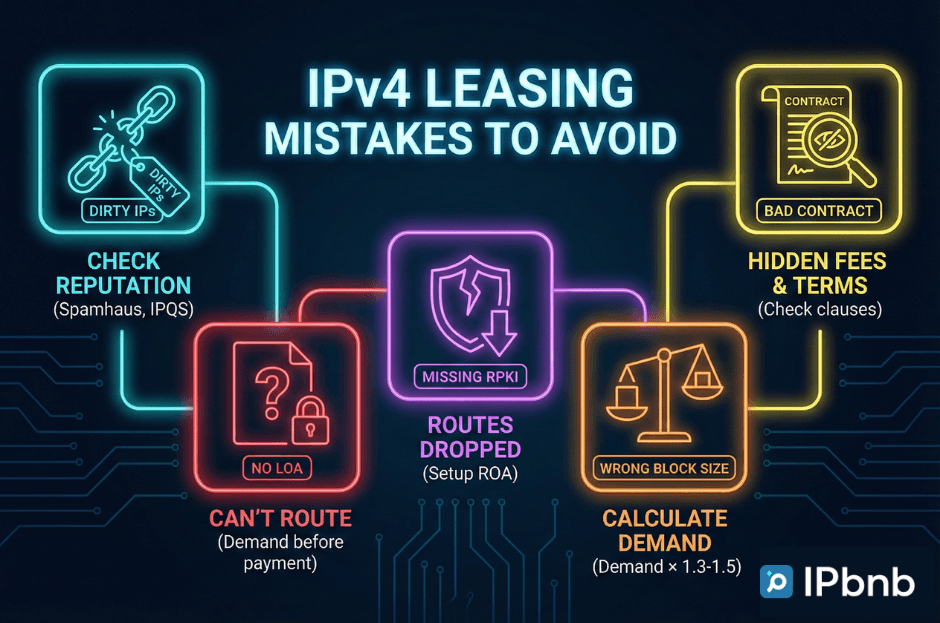
You can lose money in an IPv4 lease without even realizing it. In fact, you might be losing it right now. Leasing is a great solution for many teams, but that doesn't mean there are no traps along the way.
Most problems in IPv4 leasing aren't "bad luck." They're predictable, preventable – and surprisingly expensive. Across the industry, companies lose $5,000–$50,000 a year to avoidable issues: renting blacklisted subnets, choosing the wrong block size, missing LOA, or signing one-sided contracts.
And as IPv4 exhaustion continues – with prices hovering around $16–$25 per IP – an IPv4 lease has become the default choice for ISPs, hosting providers, VPN services, ecommerce platforms, and cloud-native teams. Fast provisioning, stable monthly costs, and no capital lock-up make leasing far more attractive than buying, especially for short-term or growing workloads.
But leasing only works when you do it right. One mistake – dirty IPs, no LOA, missing RPKI, the wrong CIDR, or a bad contract – can mean downtime, service blocks, and weeks of disruption.
That's why we created this guide: to break down the five most expensive IPv4 lease mistakes and show clear, practical ways to avoid each one. We've also added a sixth mistake that's becoming increasingly common: going for the cheapest IPv4 lease without understanding what you're giving up.
A Quick Overview of How IPv4 Leasing Works
Before we get into the pitfalls, it helps to understand what the leasing journey actually looks like – our guide on how IPv4 leasing works covers the full technical workflow. Most teams enter this process for the same reason: they're growing faster than their IP space. ISPs and WISPs need new ranges to expand coverage. Hosting providers open new PoPs. VPN and proxy companies scale worldwide nodes.
Different industries, same problem: they all need clean, routable IPv4 space – and they need it quickly.
The leasing process usually follows a predictable path. It starts with something simple: defining your use case and calculating how many IPs you realistically need. Whether you're leasing an IPv4 subnet or a full block, from there teams reach out to a few providers – usually three to five – to compare pricing, availability, and capabilities.
This is where the first real decisions happen. A good IPv4 lease service will share reputation reports for the ranges you plan to lease: Spamhaus status, RBL checks, abuse history. You'll also confirm whether they support LOA issuance, RPKI, and hosted ROAs – all of which become essential once routing begins.
After that, things move fast. You sign the contract, receive your LOA, the provider issues a ROA (if needed), and the block becomes ready for announcement through your ASN or upstream provider. From there, your team takes over: monitoring routing health, watching IP reputation, and keeping an eye on any changes in your network setup.
And here's the key point:
Every major mistake in IPv4 leasing happens at one of these stages.
Whether it's dirty IPs, missing LOA, no RPKI, the wrong block size, or a risky contract – the potential issues are baked into the workflow itself.
Once you see the process clearly, it becomes much easier to avoid the traps.
Mistake #1: Not Checking IP Reputation
Here's a sobering statistic: up to 70% of first-time renters never check IP reputation before signing their lease. They're essentially driving off the lot without looking under the hood.
What they discover too late is that their "new" IP addresses come with baggage – sometimes years of it. These "dirty" ranges arrive carrying the digital equivalent of a criminal record:
The IPs appear on major blacklists like Spamhaus, SORBS, Barracuda, or UCEPROTECT.
They're flagged for past botnet activity or fraud schemes.
Reputation engines like IPQS and Talos Intelligence have assigned them negative trust scores.
Worse yet, they're associated with historical abuse: VPN misuse, spam campaigns, or proxy farm operations that happened long before you ever touched them.
Not all IPv4 lease services are equal when it comes to reputation verification. Look for providers who run pre-delivery checks automatically - not just on request - and who can show you documentation before you sign.
The Right Way to Vet Your IPs
Think of IP reputation checking as a title search for real estate – it reveals what you're actually buying. At minimum, your audit should cover:
The essentials:
Scan for presence on 80+ DNS-based blacklists and real-time blocklists.
Pull historical abuse reports from Spamhaus SBL/CSS, UCEPROTECT, and Cloudmark.
Check fraud and spam risk scores through services like IPQS and FraudGuard.
Research past usage patterns – was this block previously used for VPN services, web hosting, mobile networks, or residential proxies?
Here's something most people miss: check the neighbors. IP pollution often spreads across an entire subnet. Whether you're leasing an IPv4 subnet or a full block, if the addresses adjacent to yours have issues, there's a good chance yours will inherit the same reputation by association.
Free tools to get started: MXToolbox Blacklist Check gives you broad coverage across major lists. The Spamhaus checker focuses on the most influential anti-spam database. IPVoid and AbuseIPDB provide crowd-sourced abuse intelligence. IPQS Reputation Score offers a single-number summary of trustworthiness.
For a complete breakdown of all major tools, read our IP reputation tools and best practices guide.
What Your Provider Should Guarantee
Your IPv4 lease agreement shouldn't be a gamble. Insist on these protections from day one:
A comprehensive IP reputation report should come standard – not upon request, but automatically. Demand a written guarantee that the addresses are clean. Build in a quarantine period of 30 to 60 days for newly assigned blocks, giving them time to clear any lingering reputation issues. And require continuous reputation monitoring throughout your lease term, not just at the beginning.
The Smarter Approach
The most successful companies don't just check reputation – they work with providers who make it impossible to receive bad IPs in the first place. That's exactly how IPbnb's trust and compliance process works. These vendors run continuous monitoring systems, automatically rotating out any addresses that develop reputation problems before they ever reach a client.
This proactive approach eliminates roughly 90% of the risks before you sign a single document. It's the difference between fighting fires and never letting them start.



Mistake #2: Ignoring LOA Requirements
There's a piece of paper that stands between you and actually using your leased IP addresses. It's called a Letter of Authorization or LOA – and it's the digital equivalent of a property deed. Without it, those IPs you just paid for might as well not exist.
Yet somehow, this critical document gets overlooked until the moment everything grinds to a halt.
Think of an LOA as your permission slip to the internet. It proves to the world that you have the legal right to announce and route a specific block of IP addresses. Without this authorization in hand, you'll hit walls everywhere you turn.
Your ISP will flatly refuse to announce the subnet. Upstream providers will block your BGP sessions before they even start. Try to onboard those addresses to AWS, Google Cloud, or Azure through their BYOIP (Bring Your Own IP) programs? Rejected. And if you ever need to change upstream networks—a routine part of infrastructure management – expect the process to stall for days or longer.
It's not a technicality. It's a showstopper.
What Makes an LOA Actually Valid
Not all Letters of Authorization are created equal. A legitimate LOA needs to contain specific information, or it won't pass muster with ISPs and cloud providers. Here's what must be included:
The legal name of the IP address holder – exactly as it appears in the registry.
The authorized Autonomous System Number (ASN) that will announce the prefix.
The precise CIDR notation of the IP block (for example, 203.0.113.0/24).
The authorization period, clearly stating how long the permission remains valid.
Miss any of these elements, and you'll be sending it back for revision while your infrastructure plans sit on hold.
When You'll Actually Need This Document
The LOA becomes essential in several common scenarios. You'll need it whenever you're leasing from a provider that's different from your ISP. It's required when announcing a prefix through your own ASN. Cloud BYOIP setups for AWS, Azure, or Google Cloud Platform won't proceed without one. Switching upstream providers means showing the new carrier your authorization. Even adding new Points of Presence to your network requires an LOA to prove you can route those addresses through the new location.
In other words: if you're doing anything beyond the most basic static IP setup, you need this document.
The Correct Sequence of Events
Getting an LOA isn't complicated – if you follow the right order:
Start by requesting the LOA immediately after signing your IPv4 lease agreement, not weeks later when you're ready to deploy.
Carefully verify that the subnet and ASN listed in the document match your actual configuration.
Forward the LOA to your ISP or cloud provider as soon as you receive it.
Wait for the route object to be created in the Internet Routing Registry (IRR) – this step can take time. Only then can you finally announce your prefix.
Trying to skip steps or rush the process only creates delays and confusion down the line.
Warning Signs to Watch For
Certain red flags should make you pause before signing a lease. If your provider refuses to issue an LOA or keeps making excuses about why it's not ready – walk away. That's not a delay; it's a sign they may not have the legal right to sublease those addresses in the first place.
Pay attention to the LOA's validity period. If it's shorter than your lease term, you'll face an administrative nightmare trying to renew authorization mid-contract. And check whether the contract includes a clear revocation procedure. You need to know how the LOA will be canceled when your lease ends – otherwise, you might remain legally tied to addresses you're no longer using.
The One Rule That Prevents All This Pain
Here's the simplest way to avoid LOA disasters: work only with IPv4 lease services who clearly guarantee LOA delivery, or get it before making your first payment.
This single step protects you completely. It ensures you're never paying for IP addresses you can't actually route. It forces the provider to prove they have the authority to sublease before you commit financially. And it gives you time to review the document and catch any errors while you still have leverage.
If a provider balks at this sequence – insisting you pay first and receive the LOA later – that's not standard practice. That's a risk you don't need to take.
Mistake #3: Skipping RPKI Setup
Here's something that should worry you: more than 60% of companies taking out an IPv4 lease never bother setting up RPKI. They configure their routers, announce their prefixes, and assume everything's locked down. It's not.
Without RPKI (Resource Public Key Infrastructure), if you want the full name – your routes are essentially floating out there unprotected. Anyone can claim to own them. And increasingly, that's becoming a problem the internet won't tolerate.
What You're Actually Risking
Think of RPKI as a digital signature that proves you're the legitimate owner of an IP block. Without it, your routes are vulnerable to several real-world threats that happen more often than you'd expect.
Accidental BGP leaks occur when someone misconfigures their router and suddenly starts announcing your prefixes to the world. Malicious hijacking is the deliberate version – bad actors redirecting your traffic through their networks to intercept or manipulate it. And here's the kicker: a growing number of major networks now automatically drop BGP prefixes that don't have valid Route Origin Authorizations. Your traffic just disappears, even though you're doing nothing wrong.
This isn't some distant theoretical risk. Major Tier-1 providers – the backbone carriers that keep the internet running – are actively implementing policies that treat invalid or missing ROAs as rejection signals. If your routes can't be cryptographically verified, they simply won't propagate.
How RPKI Actually Works
At its core, RPKI is surprisingly straightforward. It's a cryptographic system that validates whether the Autonomous System announcing a prefix is actually authorized to do so.
The key piece is something called a Route Origin Authorization – a ROA. This is a digitally signed object that creates a binding between three things: your ASN (your unique network identifier), the specific IP prefix you're announcing, and the maximum prefix length you're allowed to advertise.
Here's what a typical ROA looks like in practice:
When your BGP announcement goes out, other networks can check this ROA against their RPKI validators. If everything matches, your route gets accepted. If something's off – wrong ASN, unauthorized prefix split, missing signature – the route gets flagged or dropped.
BGP Announcement Service: What Your Provider Should Handle
A proper IPv4 lease service should include BGP announcement support as part of the offering, not as an add-on. This means the provider manages or assists with the full BGP announcement workflow: ROA creation, IRR route object updates, and LOA issuance that satisfies your upstream's filtering requirements.
When evaluating any IPv4 lease BGP announcement service, ask specifically:
Does the provider create the ROA before or after activation? It should be before, within 24 hours of signing.
Do they update IRR objects automatically when your ASN or routing configuration changes?
Can they assist if your upstream rejects the announcement due to a filtering policy?
Is ROA auto-renewal included, or do you need to manage certificate expiry manually?
Providers that treat BGP announcement support as optional or billable separately are signaling that RPKI and IRR hygiene aren't priorities for them - which means they'll become your problem instead.
What Your Provider Should Handle for You
The good news is you shouldn't have to become an RPKI expert. Your IP provider should offer hosted RPKI services, meaning they manage the technical details of certificate issuance and renewal. The ROA for your leased block should be created within 24 hours of activation, not weeks later when you finally remember to ask about it.
Auto-renewal is essential – these cryptographic certificates expire, and you don't want to wake up one morning to find your routes invalidated because nobody renewed the ROA. And whenever your routing configuration changes – new ASN, additional prefixes, different upstream providers – your provider should support quick ROA updates to match.
If a provider can't offer these basics, that's a sign their infrastructure hasn't caught up with modern routing security standards.
Getting It Set Up the Right Way
The process for proper RPKI implementation follows a logical sequence. Before you even sign the IPv4 lease, confirm that your provider supports RPKI and understands how to implement it correctly. During activation, they should issue a ROA that specifically authorizes your ASN to announce the leased prefix.
Once it's live, verify everything is working using tools like the RIPE RPKI Validator or NLnetLabs Routinator – these let you see exactly how the internet views your routes. Then establish ongoing monitoring, checking your ROA status monthly and updating it immediately after any network changes.
Tools That Make Verification Easy
You don't need expensive enterprise software to check your RPKI setup.
The RIPE RPKI Validator gives you a clear view of validation status across the major routing registries.
NLnetLabs Routinator is an open-source validator you can run on your own infrastructure.
BGPStream lets you monitor your prefixes in real-time and catch issues as they develop.
Five minutes with any of these tools tells you whether your routes are properly protected – or sitting ducks.
A Few Best Practices Worth Following
When configuring your ROA, use exact prefix matches rather than overly broad maximum lengths. If you're announcing a /24, set maxLength to 24 – not /22 or /16. This prevents someone from splitting your block into smaller pieces and hijacking part of it.
Treat ROA updates as part of your standard change management. Reconfiguring your ASN? Update the ROA first. Adding a new prefix? Get the ROA in place before announcing. And when your IPv4 lease eventually ends, coordinate with your provider to ensure the ROA is properly revoked. You don't want lingering authorizations attached to addresses you no longer control.
RPKI isn't complicated, and it's not optional anymore. It's just basic routing hygiene in a world where BGP security actually matters.
Mistake #4: Choosing the Wrong Block Size
Selecting the right IPv4 block size is one of those decisions that seems straightforward – until you get it wrong. Then it becomes an expensive lesson in operational planning.
Network teams consistently fall into two traps, each with its own painful consequences.
Over-leasing means paying for capacity you'll never use. You sign up for a /22 because it feels safer to have room to grow, but months later you're still only using 300 addresses out of 1,024 available. That excess costs you more than $15,000 annually – money that's simply evaporating into unused IP space.
Under-leasing creates the opposite problem. You try to save money with a minimal block, only to hit capacity constraints within months. Suddenly you're scrambling for expansion addresses, negotiating emergency upgrades with your provider, and dealing with the technical headaches of fragmenting your network across multiple non-contiguous ranges.
Both mistakes are avoidable. You just need to approach the sizing decision with a clear framework instead of guessing.
The Formula That Actually Works
Rather than pulling a number out of thin air, use a calculation that balances current reality with reasonable growth expectations. Here's a model that works well across most environments:
Required IPs = (Current demand × 1.3 to 1.5 growth factor) + 10–20% operational overhead
Let's break down what each piece means. Your current demand is what you're using right now – active servers, customer connections, devices on the network. The growth factor accounts for expansion over the lease term, typically 12 to 24 months. And the overhead covers routing requirements, redundancy, testing environments, and the inevitable surprises that show up once you're in production.
This approach keeps you from wildly overestimating while still providing breathing room for normal growth.
How This Looks in Real Scenarios
Theory is useful, but let's see how the math plays out with actual use cases.
Small ISP: You're serving 500 subscribers today. Apply a conservative 1.4x growth multiplier to account for customer acquisition over the next year, then add overhead for network infrastructure and routing. That brings you to roughly 805 IPs needed. The logical choice? A /22 block, which gives you 1,024 addresses – enough room to grow without paying for thousands of unused IPs.
VPN Provider: Your service handles 2,000 concurrent users at peak times. But here's where VPN economics change the calculation: users share IP addresses through Network Address Translation, typically at a 5:1 ratio. So 2,000 users actually need about 400 public IPs. In this case, a /23 block (512 addresses) provides exactly the capacity you need with some buffer for traffic spikes.
Ecommerce Platform: You're running 50 servers distributed across three Points of Presence for redundancy. Multiply that by 1.2 to account for staging environments, load balancers, and infrastructure overhead. You land at roughly 180 IPs. A /24 block (256 addresses) fits perfectly – not so large that you're wasting budget, not so tight that you can't deploy new services without IP gymnastics.
Standard CIDR Sizes and Typical Costs
CIDR | IP Count | Common Use Case | Typical Cost/Month |
|---|---|---|---|
/24 | 256 | Small ISP, SaaS | $500–800 |
/23 | 512 | Medium ISP, VPN | $900–1,400 |
/22 | 1,024 | Large ISP | $1,600–2,800 |
Note: /24 is the minimum block size accepted for global BGP announcements.
A Smarter Scaling Strategy
Instead of leasing a large block upfront, many operators benefit from a phased approach:
Phase 1 (Months 1–6): Start with /24
Phase 2 (Months 7–12): Expand to /23
Phase 3 (Year 2+): Move to /22 if utilization warrants it
This incremental model typically reduces total leasing spend by 25–30%, while maintaining operational flexibility.
Common Sizing Mistakes
Teams often miscalculate because they:
Base sizing only on current active users.
Forget routing, NAT, and infrastructure overhead.
Ignore workload specifics – such as VPN concurrency ratios, CGNAT strategies, or burst patterns.
Fail to include a contingency buffer.
Best Practice: Use current demand plus a 20–30% buffer, apply expected growth, and round to the nearest standard CIDR block. Whether you're leasing an IPv4 subnet for a test environment or a full /22 for production traffic, a basic subnet calculator can quickly validate the final allocation.
Mistake #5: Not Reading Contract Terms
Here's an uncomfortable truth: roughly 80% of companies entering an IPv4 lease never fully read their contracts. They skim the price, check the block size, sign on the dotted line, and move on. Then, months or years later, they discover what they actually agreed to. By that point, the damage is already done.
What Actually Matters in These Contracts
IP leasing agreements aren't particularly long or complex, but certain sections deserve your full attention. Miss these details, and you're setting yourself up for exactly the kind of surprise the startup faced.
Lease Duration and Renewal Terms
The structure of your IPv4 lease commitment carries more implications than just the calendar dates. Start by examining the initial term – typically anywhere from six to 36 months. Then look at how renewal works. Is it opt-in, where you actively choose to continue? Or opt-out, where you're automatically re-enrolled unless you proactively cancel?
Pay special attention to the notice period required for cancellation. Some contracts demand 90 days' advance notice, which means you need to decide whether to renew a full quarter before your term ends. Miss that window by even a day, and you're locked in for another full cycle.
Also check for price adjustment clauses. Some providers build in automatic annual increases of 5–10%, which can significantly change your budget projections over a multi-year term.
Red flags to watch for: Auto-renewal that kicks in without any notification to you. Fixed annual price increases that compound over time. Cancellation requirements longer than 60 days – anything demanding 90 days' notice severely limits your flexibility.
Termination and Revocation Rights
This is where power dynamics get written into the contract, and you need to understand who can walk away, when, and under what conditions.
Reasonable terms give the lessor (the provider) the ability to revoke the lease with at least 90 days' notice—this protects them if circumstances change. You, as the lessee, should be able to terminate with 30 to 60 days' notice without facing punitive penalties. And if early termination fees apply, they shouldn't exceed one to two months' rent.
Anything harsher than this framework suggests a provider who's more interested in locking you in than maintaining a healthy business relationship.
The Fee Structure Hiding in Plain Sight
Not all costs appear in the monthly rate. Many providers tuck additional charges into separate line items that only become clear when you actually need the service. Here's what typical fees look like versus what you should actually accept:
Fee Type | Typical | Should Be |
|---|---|---|
Setup | $0–500 | Free |
LOA | $0–200 | Free |
RPKI management | $0–100/mo | Included |
Early termination | 1–6 mo rent | 1–2 mo |
These fees add up quickly. A seemingly affordable $800/month lease can balloon to $1,200/month once all the extras are factored in.

Technical Support Commitments
Your provider's support obligations matter more than you might think, especially when something goes wrong at 2 AM or you need to make an urgent routing change.
Look for specific promises around IP replacement if your addresses end up blacklisted through no fault of your own. Confirm that LOAs and ROAs will be delivered within 24 to 48 hours, not "within a reasonable timeframe" (which can mean anything). Check what response time they commit to – four hours is excellent, 24 hours is acceptable, anything longer leaves you vulnerable during outages. And verify their uptime guarantee, which should be at least 99.9%.
Vague language like "best effort support" or "we'll try to respond quickly" means you're on your own when it counts.
Restriction Clauses That Limit How You Operate
Some contracts include limitations on how you can actually use the IP addresses you're paying for. These restrictions can interfere with legitimate business operations if you're not aware of them upfront.
Common restrictions include prohibitions on sub-leasing (which makes sense), geographic limitations on where you can announce the addresses (which may or may not align with your needs), use-case restrictions that prevent certain types of traffic, and definitions of "abuse" that might be broader than you expect.
That last one is particularly important. If the contract defines "abuse" vaguely – say, "any activity that generates complaints" – you could face termination over things outside your control, like a competitor filing false reports.
Mistake #6: Going for the Cheapest IPv4 Lease
Price is an obvious filter when evaluating providers. But choosing the cheapest IPv4 lease available is one of the most reliable ways to end up with exactly the problems this guide is designed to help you avoid.
Here's why the cheapest option usually isn't cheap at all:
Blacklisted IP space. Providers offering below-market rates often populate their inventory with blocks that have abuse histories - subnets that have been through botnet activity, spam campaigns, or proxy farm operations. Cleaning up a dirty block after the fact can cost weeks of operational disruption and, in some cases, is simply not possible on the timeline your business requires.
No RPKI or IRR support. Budget IPv4 lease services frequently skip the infrastructure investment required for proper RPKI management and IRR hygiene. Whether you're leasing an IPv4 subnet or a full /22, without correct ROAs and route objects your BGP announcement may be rejected by an increasing number of networks enforcing origin validation. You're paying for address space that doesn't route cleanly.
No abuse desk. When something goes wrong - and in IP operations, something always eventually goes wrong - you need a provider with a real 24/7 abuse response process. Cheap IPv4 lease services typically lack this. A single unresolved abuse complaint can escalate to a blacklist entry that affects your entire operation.
No LOA guarantees. As covered in Mistake #2, an LOA is non-negotiable. Low-cost providers often treat LOA issuance as a manual, slow, or billable process. If your upstream blocks your BGP session because the LOA is delayed or incorrectly formatted, the money you saved on the cheaper lease is gone in the first week.
Hidden fees that close the price gap. Cheap base rates frequently come with setup fees, RPKI management fees, LOA issuance fees, and early termination penalties that erode any savings. A /24 advertised at $450/month can easily become $700/month once every line item is accounted for.
What to do instead: Get full pricing breakdowns from at least three providers - not just the monthly rate, but every fee. Compare total cost of ownership over your planned lease term. Then evaluate each provider against the reputation, LOA, RPKI, and contract criteria in this guide. Not all IPv4 lease services are equal.
Look for providers who include reputation guarantees, RPKI management, and LOA issuance as standard - not as upgrades. The difference in price between a responsible provider and a budget one is usually smaller than it appears, and the operational cost of getting it wrong is always higher.
Getting It Right from the Start
The six mistakes we've covered – overlooking IP reputation, missing LOA requirements, skipping RPKI, choosing the wrong block size, ignoring contract terms, and going for the cheapest IPv4 lease – cause most of the expensive headaches in IPv4 leasing. They're not edge cases. They're predictable traps that ambush unprepared teams.
Teams that avoid them see results quickly: thousands saved each year, fewer outages, and far less chaos during incidents.
Here's the economics in plain terms: a $500/month IPv4 lease can become a $15,000 problem if you sign blind. Four hours of focused prep can prevent a hundred hours of emergency firefighting.
IPbnb is built to remove the common failure points: pre-vetted blocks with reputation guarantees, automated LOA issuance, built-in RPKI management, and clear, human-readable contract terms. What used to take weeks now fits into a single work session – and you're online with confidence.
You've got the questions to ask, the red flags to spot, and the protections to demand. With the right preparation – and the right partner – IPv4 leasing is straightforward, cost-effective, and sets you up for stable operations from day one.
Once you know what to avoid, the next step is choosing the right provider – use our 10-point evaluation framework.