


Bring a Leased /24 to OVHcloud: BYOIP Guide
This guide walks through the numbers, the requirements, how the import actually works, and the exact steps to bring a leased /24 into OVHcloud.

Artem Kohanevich
Co-Founder & CEO at IPbnb
Last updated
Table of Contents
item

Every extra IPv4 address on your OVHcloud bill is a small tax you pay again every month, for as long as the service runs. Across a full /24 it stops being small: at OVHcloud's current rate of $2.39 per IP, 256 rented addresses cost about $612 a month, and you never own a single one of them. OVH BYOIP (Bring Your Own IP) is the way off that treadmill. It lets you announce IPv4 ranges you already control, owned or leased, from OVHcloud's network at no extra cost, so you pay for the block itself and nothing more. Lease a clean /24 through IPbnb from $79 a month, import it with BYOIP for free, and those same 256 addresses cost around 85% less, with the block and its reputation staying yours.
This guide walks through the numbers, the requirements, how the import actually works, and the exact steps to bring a leased /24 into OVHcloud. BYOIP is not unique to OVH, so if you are comparing providers, our overview of how to bring leased IPv4 to any major cloud sets OVHcloud alongside AWS, Google Cloud, and Azure.
Why BYOIP beats OVH Additional IP on cost
OVHcloud's Additional IP product, the successor to the old Failover IP, is billed per address. After the April 2026 price update, OVHcloud lists Additional IPv4 at $2.39 per IP per month, with no setup fee and no commitment. European customers are billed the local-currency equivalent. A handful of addresses is no big deal. A full /24 is another matter: 256 addresses at $2.39 works out to roughly $612 a month, every month, for as long as you keep them, and you never own the block or its reputation.
BYOIP changes the model. You bring addresses you already control, and OVHcloud announces them for you at no extra charge. That leaves one real question: where do those addresses come from? You can rent OVH's, buy your own, or lease a block and import it. Here is how the three options compare for a single /24.
Approach | Upfront cost | Monthly cost (a /24, 256 IPs) | The trade-off |
|---|---|---|---|
Rent OVHcloud Additional IPs | None | ~$612 (256 × $2.39) | Recurring forever. You never own the block or control its reputation. |
Buy a /24 outright | ~$7,000–12,000+ (RIPE space at the higher end) | $0 for the addresses, $0 for BYOIP | Large upfront spend. RIPE blocks carry a 24-month hold before you can re-transfer them. |
Lease a /24 via IPbnb + BYOIP | None | From $79 (lease) + $0 BYOIP | Around 85% cheaper than renting OVH's IPs, with your own portable reputation. Cancel with one day's notice after the first month. |
Buying makes sense if you need the block for years and want it on your balance sheet. For most hosting, SaaS, and migration workloads, leasing plus BYOIP is the pragmatic choice: no five-figure outlay, no registry hold period, and an address layer that costs a fraction of OVH's per-IP rate. You can model your own block size against buy and lease prices in the IPbnb pricing calculator.
OVH BYOIP requirements
Before you order, the block has to meet a short checklist. IPbnb-leased blocks are prepared to satisfy all of it out of the box, but it is worth understanding each point.
Registry and object type. The range must be registered with ARIN, RIPE NCC, or APNIC. Support for National Internet Registries is still experimental, and AFRINIC and LACNIC space is not accepted at present. For RIPE, the inetnum status has to be a genuine allocation or assignment, such as ALLOCATED PA or ASSIGNED PA, and the WHOIS record must match the imported prefix exactly. A parent or child object will not work.
Prefix size. OVHcloud accepts blocks from /24 (256 addresses) up to /19 (8,192 addresses). Whatever you import is delivered as one or more /24 blocks: a /24 gives you one, a /22 gives you four, a /19 gives you thirty-two. Anything smaller than a /24 is not accepted, and anything larger than a /19 needs a direct conversation with OVH sales.
A clean, unannounced block. The range should not be advertised anywhere else on the internet when it goes live at OVH. If it is announced from two places at once, you risk packet loss, and OVHcloud will not guarantee connectivity. Reputation counts too: OVH can refuse a block with a poor history, or stop announcing one whose reputation starts to drag on its network.
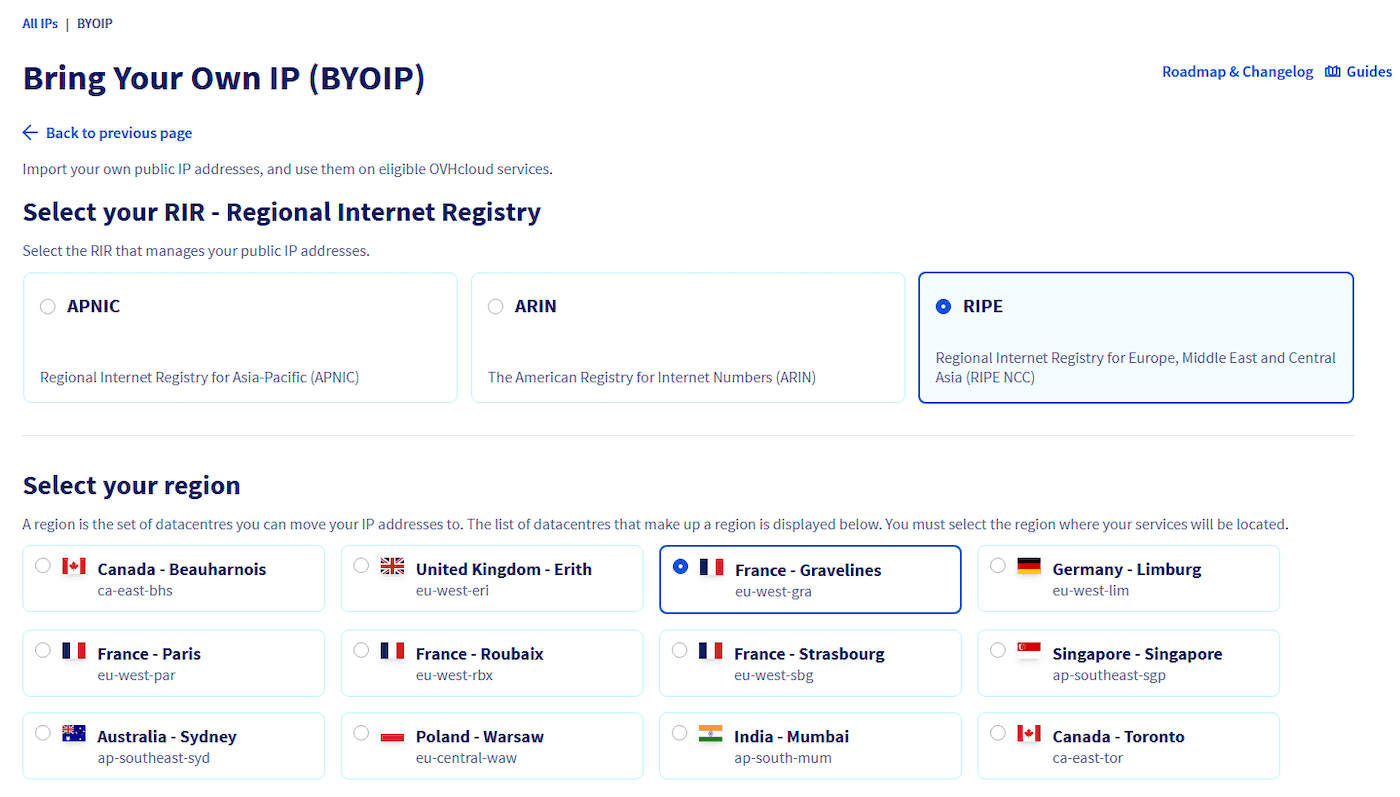
Region flexibility, which is new and worth knowing. OVHcloud has removed its old geographic restriction. Previously an ARIN block could only be used in the US or Canada, and a RIPE block only in Europe. Today you can use an ARIN, RIPE, or APNIC block in any OVHcloud region. For a RIPE-region operator, that means your European address space is no longer confined to European data centres. You still pick one region per imported range at order time, across OVHcloud's European sites (Paris, Gravelines, Roubaix, Strasbourg, Limburg, Warsaw, Erith, and Milan), North America, and Asia-Pacific, and a range cannot be moved to a different region afterwards without releasing and re-ordering it.
Two more points make BYOIP easy to justify. OVHcloud's always-on Anti-DDoS protection covers imported ranges at no additional cost. And if you are heading toward announcing your own address space, OVH supports Bring Your Own AS, so your ASN can sit behind OVH's AS16276 in the BGP path. Most leased-block imports do not need that, but it is a natural next step. Our guide on what BYOIP is and how it works goes deeper on the routing side.

How the import works: OVH failover IP mechanics
BYOIP is built on top of OVHcloud's Additional IP and Failover IP machinery, so imported addresses behave like the Additional IPs you may already use. Once your range is delivered, it is split into /24 blocks that you manage from the Control Panel or the IP API, exactly as you would any other Additional IP block.
The key thing to understand is that announcement is assignment-driven. Your imported block does not go live the moment it is delivered. OVHcloud starts advertising a /24 only when you attach it, or a sliced portion of it, to an eligible service such as a Bare Metal server, a Public Cloud instance, a Hosted Private Cloud host, or a service reachable through vRack. Detach it, and the announcement stops. By default OVHcloud announces the block from AS16276; with Bring Your Own AS, your ASN appears behind AS16276 in the path.
A few practical limits are worth planning around. A /24 moves freely between services within its chosen region, but not across regions. You can slice a /24 into smaller blocks down to individual /32s, or merge them back, through the API, as long as the block is unused at the time. Reverse DNS is handled through ARPA zones that OVHcloud delegates for you, so you can still set PTR records, but you cannot edit the block's WHOIS from the OVH panel, because OVHcloud does not own the addresses. That last detail is exactly why leased blocks work: control of the WHOIS object stays with the holder.
Step by step: importing a leased /24 to OVHcloud
Here is the end-to-end sequence for a RIPE /24 leased through IPbnb.
Confirm the block is import-ready. The inetnum has a supported status, the block is clean, and it is not announced anywhere else. IPbnb-leased blocks arrive in this state.
Create the route object. At RIPE, publish a route object for the exact prefix, with OVHcloud's AS16276 in the origin field, or your own ASN if you are using Bring Your Own AS.
Add the ownership token. When you begin the order, OVHcloud gives you a token. Place it on its own line in the
descrfield of the RIPE inetnum object, and in theaut-numobject as well if you are importing your own AS. Leave it there until delivery completes. With a leased block, this is the step the IP owner handles or delegates, since only the holder can edit the object.Place the order in the Control Panel. Go to Network > IP, click + Bring Your Own IP, select the RIR (RIPE), choose your region, enter the range, and pick the OVHcloud AS (recommended) or your own AS. Confirm the order.
Wait for validation and delivery. OVHcloud checks the token and the routing objects, then creates the ARPA zones for reverse DNS. Per OVHcloud, imported addresses become available within a few weeks.
Go live. Assign a /24 to an eligible service to trigger the BGP announcement. If the block was advertised elsewhere before, withdraw that announcement immediately once OVH delivery is done.
When you no longer need the block, cancellation is simple: filter your services for "byoip", select the range, and cancel either immediately or at the end of the billing period. The announcement drops when the block is unassigned or the service ends, and the addresses return to the holder.
Bringing leased (non-owned) ranges
BYOIP is often assumed to be for address owners only. It is not. OVHcloud's process accepts any block you can prove control over, and "control" is demonstrated by placing that token in the WHOIS object and publishing the matching route object. Whoever holds the block, or is authorised by the holder, can complete those steps.
That authorisation is what a proper leasing arrangement provides. When you lease a /24 through IPbnb, you receive a block already prepared for BYOIP: the WHOIS status is correct, a Letter of Authorisation (LOA) confirms your right to route it, and the ROA and route-object work is done so OVHcloud's validation passes cleanly. The registered holder authorises OVHcloud to announce the range, and you get the operational use of it without the capital cost of buying. This is the difference between a leasing provider that genuinely supports BYOIP and one that simply hands you addresses and wishes you luck.
Reputation and geolocation
Two housekeeping tasks decide whether a block behaves well after the move.
Reputation. Check the block against the major blocklists before you import, not after. OVHcloud can refuse a block with a bad history and can stop announcing one whose reputation degrades, and any delisting is the customer's responsibility. A clean leased block from a reputable provider spares you most of this, but a pre-flight check is still wise.
Geolocation. When a block moves into an OVHcloud region, geolocation databases will not know until you tell them. Publish or update a geofeed for the range, then submit corrections to the main providers, such as MaxMind and IP2Location, so the addresses resolve to the right country. Keep reverse DNS, handled through the ARPA zones OVH delegates, consistent with the new use. Allow a little time for third-party databases to catch up after you submit.
The same mechanics apply on other platforms, so if OVHcloud is one option among several, our AWS BYOIP walkthrough covers the same ground for Amazon's network.
OVH BYOIP FAQ
Does OVHcloud charge extra for BYOIP?
No, BYOIP itself is included at no extra cost, so you avoid the $2.39 per IP per month Additional IP fee on the ranges you import. The addresses are managed like standard Additional IPs, which is where the saving over renting OVH's own IPs comes from.
What is the smallest prefix I can import?
A /24, which is 256 addresses, is the minimum, and a /19 is the maximum. Anything larger than a /19 needs a direct request to OVHcloud.
Can I bring leased, non-owned IPv4 to OVHcloud?
Yes, provided you have authorisation from the block's registered holder. IPbnb supplies BYOIP-ready leased blocks with an LOA and the routing objects prepared, so OVHcloud's validation passes.
How long does the import take?
OVHcloud states that imported addresses become available within a few weeks of ordering, assuming your WHOIS token and route object are published before you submit.
What happens when the lease ends?
The block is withdrawn from OVHcloud and returned to the holder. You cancel the BYOIP service, immediately or at period end, detach the range from your services, and OVH stops announcing it.
Get Started → my.ipbnb.com/auth/sign-up